PDF File Plus
- 4.1
- Rating
- 10.00M
- Installs
- Free
- Price
 Analysis by App-foxy
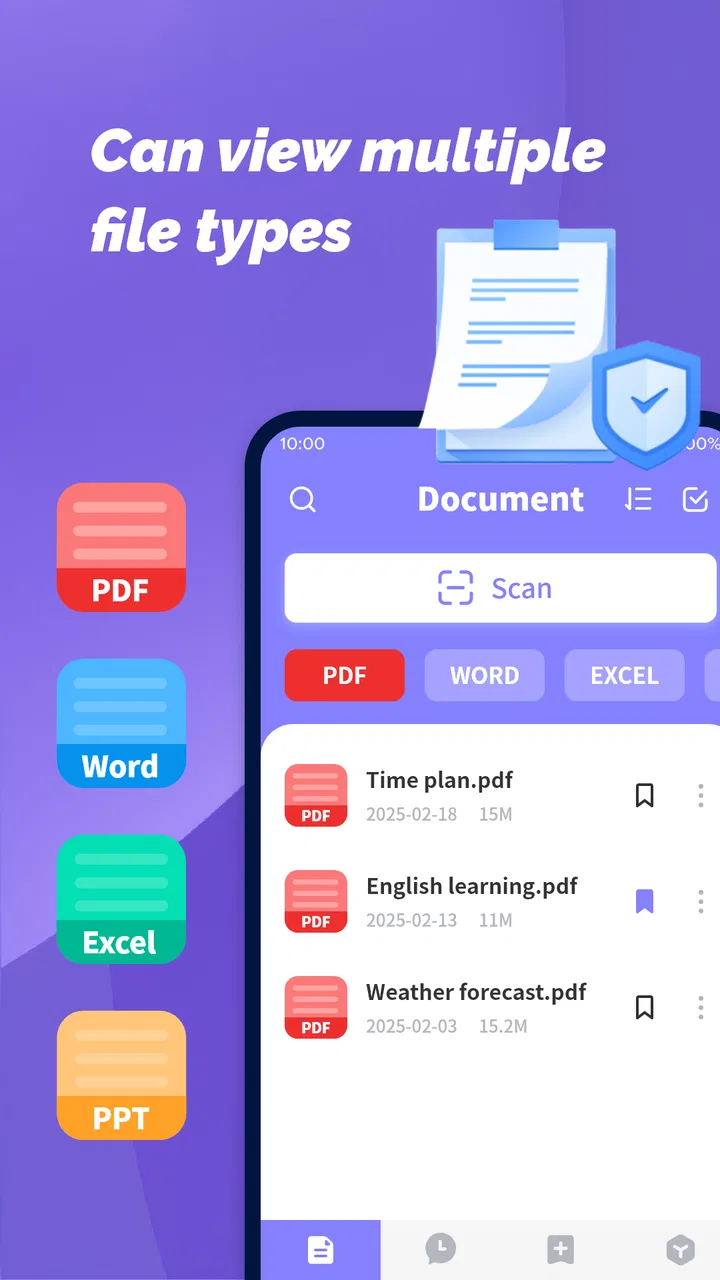
I approached PDF File Plus as the kind of utility many people install only after a document refuses to open at the wrong moment. Its purpose is straightforward: provide a lightweight way to read PDF, Word, and Excel files on a phone or tablet. That narrow focus is also its main appeal. Instead of treating mobile productivity as a full office replacement, it aims to make everyday documents accessible without turning the device into a complicated workstation.
In my experience, the right question is not whether it can replace every document tool you already use. The better question is whether you need a simple reader that keeps several common file types together. If you mainly receive attachments, check forms, review notes, or glance through spreadsheets while away from a computer, this app makes a sensible case. If you need serious editing, collaboration, or advanced spreadsheet work, I would judge it much more cautiously.
What I looked for before recommending it
When I assess a document reader, I start with the small moments that decide whether it stays installed: how quickly a file opens, whether the text is comfortable to read, whether moving between documents feels obvious, and whether the app remains useful when the file is not a PDF. PDF File Plus is positioned in the productivity category, but its value comes from convenience rather than a long list of professional tools.
You May Also Like

 Blood Strike: 2.5 Anniversary
Blood Strike’s Loadouts Turn Every Drop Into a Tactical Gamble
A close look at Blood Strike’s custom loadouts: how fast access to signature weapons reshapes its battle royale rhythm, rewards preparation, and narrows the gap between fights.

 Pandora - Music & Podcasts
Pandora’s Music Is Easy to Start, but Harder to Recover
Pandora’s strength is its low-effort path from a seed to a station. Its weak spot is how much confidence it asks you to place in connection, setup, and quiet recovery.

 8 Ball Pool
 Is Built on Rivalries, Rematches, and Routine
A close look at the rivalries, rematches, shared routines, and unanswered safety questions that turn a quick pool match into a persistent mobile community.

 Samsung Music
’s Quiet Strength Is Playing What You Already Own
Its reach comes less from spectacle than from dependable access to a personal library. That simplicity is both the app’s strongest retention engine and its ceiling.

 AccuWeather: Weather Radar
AccuWeather Review: A Quick, Clear Forecast for Everyday Decisions
For everyday plans, the best forecast is the one you can understand quickly. AccuWeather makes rain timing, radar, and local conditions easy to act on, with a few trade-offs.

 Hill Climb Racing
Why Hill Climb Racing Still Turns Crashes Into One More Run
A tiny car, a bumpy hill and one more upgrade: Hill Climb Racing keeps resurfacing because its simple chaos makes every near-miss feel personal.
More From Our News Desk



The developer, Nullbyte Labs, presents it as a lightweight PDF, Word, and Excel reader. That description sets a useful expectation. I would not install it expecting a complete office suite. I would install it when I want one place to read several familiar document formats without choosing a separate app for each one.
Compatibility is especially important for people who regularly move between work, school, and personal files. A PDF may be a finished form, a Word file may be a draft, and an Excel document may be a quick list or budget. Keeping those jobs within one reader can reduce the friction of opening an attachment, checking its contents, and returning to the conversation or folder where it came from.
The app is free, which changes the decision considerably. There is no purchase decision to make before trying the basic experience. That makes it easier to use as a secondary reader alongside an existing office application. Rather than replacing everything immediately, I would test it with the files I actually handle and see whether its simplicity is an advantage or a limitation.
Its age rating is Everyone, and it supports devices running Android 6.0 or later. That broad compatibility is useful if you are keeping an older phone in service or using a budget device that does not run the newest software. The current version is 1.1.3, so I would still keep expectations realistic: this feels like a focused utility, not a mature document-management platform with years of accumulated enterprise features.
The everyday test: receiving a document on the move
Imagine receiving a message while commuting with a PDF form, a Word itinerary, and an Excel expense sheet attached. You do not need to redesign the form, rewrite the itinerary, or build formulas. You simply need to open each item, read it clearly, and decide what to do next. This is the situation where a lightweight reader earns its place.
I like that this use case does not require a complicated setup in your head. The app’s identity is clear: open common documents and read them on a mobile screen. That clarity matters because many productivity apps become frustrating when they present editing controls, templates, cloud features, and account prompts before you have even seen the file.
For a student, the same approach works when checking a handout, reviewing a Word assignment, and looking at a spreadsheet shared by a group. For a small business owner, it can be a practical way to inspect an invoice, a proposal, or a stock list before responding to someone. For a traveler, it may be enough to read a booking document or itinerary without carrying a laptop.
Where the lightweight approach works best
The strongest reason to choose this app is consolidation. A dedicated PDF reader may handle PDFs well, while a separate office app may cover Word and Excel. That arrangement can be perfectly good, but it also means remembering which app opens which attachment. PDF File Plus is more appealing when your priority is a single, uncomplicated reading point for several document types.
That does not automatically make it better than specialized alternatives. A dedicated PDF tool is usually the safer choice when your work depends on advanced annotation, form completion, page organization, or precise document workflows. A full office suite is usually more suitable when you need to edit text, change spreadsheet formulas, or prepare a file for someone else. The advantage here is not depth; it is a lighter decision at the moment of opening a file.
One useful habit is to treat it as a first-pass reader. I would use it to inspect an unfamiliar attachment before deciding whether the document needs a more powerful tool. That workflow avoids opening a full office suite for a file that only needs a quick check. It also helps separate reading from editing, which are often very different tasks on a small screen.
Another practical tip is to use it for triage rather than long-form production. If several files arrive together, quickly identify which ones need action, which ones can wait, and which ones are duplicates or irrelevant. A lightweight reader is well suited to that first decision. Once a file needs substantial changes, I would move it to a more specialized application instead of forcing a reader to behave like an editor.
Reading comfort matters more than feature count
Mobile document reading is not simply a smaller version of desktop reading. A spreadsheet can become difficult when columns extend beyond the screen, and a Word document can feel awkward when pages are designed for printing. PDF File Plus makes sense for people who value access and basic inspection, but the experience will naturally depend on how the original document was created.
For short documents, receipts, simple tables, and ordinary text files, a reader can be perfectly adequate. Long reports and wide spreadsheets require more patience. I would not choose this kind of app as my only tool for reviewing dense financial models or carefully checking a complex layout. In those situations, a larger display or a full office environment is simply more comfortable and more reliable.
A non-obvious advantage of a focused reader is that it encourages you to ask what you really need from the file. If the answer is “read the information,” the lightweight route may be enough. If the answer is “change the information and preserve exact formatting,” the reader is probably only the first step. Recognizing that distinction before starting saves time and prevents disappointment.
How it compares with the usual alternatives
There are three broad choices for this kind of task. The first is a dedicated PDF reader, which is often best when nearly all your files are PDFs and you rely on document-specific tools. The second is a full office suite, which makes more sense when editing, formatting, and collaboration are central. The third is a built-in file viewer or a collection of separate apps, which may be enough if you only open documents occasionally.
PDF File Plus sits between those options. It is broader than a PDF-only tool because it also targets Word and Excel reading, but it is less ambitious than a full office suite. That middle position is useful for casual document access. It is less convincing for anyone whose phone is a primary work computer.
I would also compare it with whatever is already installed on your device. If your current file manager opens every document you receive and you are happy with the result, switching may not improve much. If your existing setup repeatedly sends you between incompatible viewers, a single lightweight reader could feel more convenient. The decision depends less on brand loyalty and more on how often your present arrangement interrupts you.
What you should expect before making it your main tool
The free price makes experimentation easy, but it should not be confused with unlimited capability. A reader can show you a document without giving you the tools needed to change it. Before relying on PDF File Plus for work, I would try the exact files that matter to me: a long PDF, a Word document with formatting, and an Excel sheet with several columns.
This test is more useful than judging the app by a simple attachment. A basic document may open comfortably while a complex file exposes the limits of mobile viewing. If your routine involves forms, check whether reading is enough or whether you need to type into fields. If your routine involves spreadsheets, decide whether you only inspect values or need to edit formulas and preserve layout.
I would also keep the original files in their existing folders or messages during the trial. That makes it easier to compare the app with your current workflow and avoid treating a new reader as a document backup system. A viewer can be useful without becoming the place where your important files are organized permanently.
Another trade-off is mental simplicity versus professional control. The fewer controls an app emphasizes, the less intimidating it may feel for quick reading. At the same time, people who need annotations, revisions, exports, or collaboration may find that simplicity turns into extra switching. There is no universal winner here. The best choice depends on whether your priority is opening files or working on them.
Who will get the most from it
I can recommend PDF File Plus to someone who receives documents frequently but edits them rarely. It is a good candidate for students checking shared materials, families opening forms and schedules, and workers who need a convenient second opinion on an attachment before returning to their main computer.
It also suits people who prefer a focused app over a large productivity package. Not everyone wants email, storage, document creation, collaboration, and spreadsheet editing bundled into one interface. If you find full office suites distracting for simple reading, this narrower approach may feel more comfortable.
The app’s broad device support is another reason it may appeal to practical users rather than enthusiasts. If you use an older Android device, the minimum requirement of Android 6.0 or later leaves room for hardware that newer productivity tools may not target. I would still judge performance using your own files, because document complexity can matter as much as the phone itself.
Who should choose something else
I would steer away from it as a sole work solution if you regularly create polished documents, maintain complicated spreadsheets, or need a dependable editing and collaboration workflow. In those cases, a full office suite is the more logical center of your setup. You may still keep PDF File Plus for quick viewing, but it should not carry responsibilities it was not designed to handle.
I would also hesitate if nearly all your needs involve advanced PDF work. A specialized PDF application is likely to be a better fit when you depend on detailed annotations, page manipulation, signatures, or other document-specific actions. The fact that an app can read a PDF does not mean it is the best tool for every PDF task.
People who rarely open documents at all may not notice enough benefit to justify changing their habits. If your phone already handles occasional attachments comfortably, installing another reader could add choice without adding value. In that situation, the simplest option is often to keep using what already works.
The switching cost is low, but the testing step is important
Because the app is free, trying it alongside your current tools is relatively easy. I would not uninstall an established office suite on the first day. Instead, I would use PDF File Plus for ordinary reading and reserve the older tool for files that need editing. This two-step approach reveals whether the new app genuinely reduces friction.
The main cost is not money; it is habit. You may need to decide which app should open a file, remember where editing happens, and avoid assuming that a reader will preserve every part of a complex document exactly as a desktop program does. Those are small costs for casual users, but they matter when documents arrive during time-sensitive work.
A sensible trial routine is to open one PDF, one Word file, and one Excel file from your normal sources. Then repeat the task on a day when you are in a hurry. The first test shows basic compatibility; the second shows whether the app actually makes your routine faster. If it does, keep it as your reading layer. If it does not, there is little reason to force the change.
My recommendation after weighing the trade-offs
PDF File Plus is a practical choice for straightforward document reading on Android. Its free access, Everyone rating, support for Android 6.0 and later, and focus on PDF, Word, and Excel files give it a clear audience. The app has also attracted an average rating of 4.5 from around 3.3 thousand ratings, with more than 5 million installs, which suggests that its simple purpose has found a substantial audience.
Those figures do not change my central judgment: its usefulness depends on keeping the job small. I would recommend it to a friend who wants one lightweight reader for common attachments and does not need to edit everything from a phone. I would describe it as a convenient front door for documents, not as a complete office.
My final advice is to install it when your problem is document access, not document production. Use it to inspect files, sort out what deserves attention, and read everyday material without opening a large suite. Keep a specialized editor available for serious changes. With that division of labor, the app’s simplicity becomes a strength rather than a missing feature.
For that specific audience, PDF File Plus is worth trying. It is most convincing as a low-friction reader that covers three familiar formats in one place. If your needs grow into editing, collaboration, or advanced PDF handling, move to a stronger alternative without regret. The app succeeds when you ask it to make reading easier—and when you avoid asking it to become something larger than that.
FAQs for PDF File Plus
01What platforms is PDF File Plus available on?
PDF File Plus is available for both Android and iOS devices, providing a seamless experience across smartphones and tablets. This cross-platform availability ensures you can access and manage your PDF documents on any device, making it a versatile tool for users who often switch between operating systems.
02Does PDF File Plus support editing and annotating PDFs?
Yes, PDF File Plus offers robust editing and annotation features. You can highlight text, add comments, and even insert images or shapes into your documents. This makes it a powerful tool for students and professionals who need to collaborate or make notes directly on their PDF files.
03Is it possible to convert other file formats into PDFs using PDF File Plus?
Absolutely. PDF File Plus supports converting a variety of file formats into PDFs, including Word, Excel, and PowerPoint documents. This conversion capability is especially useful for users who need to standardize documents into a universally accessible format for sharing or printing.
04How secure is my data when using PDF File Plus?
PDF File Plus prioritizes user security by providing options for password protection and encryption of your documents. This ensures that sensitive information remains confidential. Additionally, the app does not store any of your data on external servers, keeping your information private and secure.
05What are the limitations of the free version of PDF File Plus?
The free version of PDF File Plus offers basic functionalities like viewing and simple editing. However, advanced features such as converting files, extensive editing tools, and certain annotation options may require a subscription. This tiered access allows users to try the app before committing to a purchase.
Pros
- User-friendly interface for easy navigation.
- Supports a wide range of PDF formats.
- Fast conversion and processing speed.
- Secure with robust encryption features.
- Integrates well with cloud storage options.
Cons
- Limited free version with basic features.
- Occasional ads can be disruptive.
- No built-in OCR for scanned documents.
- Lacks advanced editing tools.
- Requires internet for certain features.

PDF File Plus
Gallery